What is the WhatsApp Business API?
WhatsApp has over three billion users across 180+ countries, so for most businesses it is now the channel customers actually read and reply on. A small shop can run fine on the free WhatsApp Business app on one phone. But once you have many agents, thousands of customers, order updates, OTPs and campaigns, you need something that automates and scales — that is the WhatsApp Business API (part of the WhatsApp Business Platform).
The API is a backend interface provided by Meta. It has no app screen of its own — instead it connects WhatsApp to your software: a shared inbox, CRM, help desk or chatbot. Think of it as the pipe between Meta's messaging network and the tools your team already uses. For example, when a customer places an order your system can automatically send a confirmation, then a dispatch update, then a delivery message — all on WhatsApp, with no one typing them by hand.
In short: the WhatsApp Business app is a chat app; the WhatsApp Business API is a connection you plug into business software so many people and systems can message customers on one number, at scale.
WhatsApp Business API vs WhatsApp Business app
Both are official, free-to-start products from Meta. The difference is who they are built for.
| WhatsApp Business app | WhatsApp Business API | |
|---|---|---|
| Best for | Solo owners, small shops | Growing teams, mid-size & enterprise |
| Users on one number | 1 phone (a few linked devices) | Unlimited agents |
| Automation & chatbots | Very limited | Full — flows, rules, AI |
| Bulk / campaign messaging | Manual, capped | Approved templates at scale |
| CRM / software integration | No | Yes, via software |
| Analytics & delivery reports | Basic | Detailed |
| Interface | Built-in app | Needs a platform (e.g. Pro Chat Desk) |
| Cost | Free | Pay Meta per template message |
The app suits manual, one-person chat. The API suits teams that need automation, many agents and reporting — but it needs a front-end, which is where a platform comes in.
Types of messages you can send
The API has two message modes, and knowing the difference is the key to using it well.
1. Template messages (business-initiated)
To start a conversation or message someone outside the 24-hour window, you must use a pre-approved template. Templates support variables for personalisation (name, order number, amount) and come in three categories:
Marketing
Offers, promotions, product launches, re-engagement and abandoned-cart nudges.
Utility
Transactional updates tied to an action — order confirmed, payment received, shipped, delivered, reminders.
Authentication
One-time passwords and verification codes for login and checkout.
2. Free-form messages (the 24-hour window)
When a customer messages you first, a 24-hour service window opens. Inside it your agents (and chatbot) can reply freely — plain text, images, PDFs, location, buttons and lists — with no template needed. Each new customer message re-opens the window.
Rule of thumb: templates start conversations; free-form replies continue them inside the 24-hour window.
What you need to use the API
Five things sit behind every WhatsApp API number. With Pro Chat Desk most of these are handled for you in one guided flow, but it helps to know what they are.
- Meta Business Manager: Meta's central account that holds your business assets and permissions.
- WhatsApp Business Account (WABA): the WhatsApp-specific account that holds your numbers, templates and quality rating.
- A dedicated phone number: a number not currently active on the normal WhatsApp or WhatsApp Business app. It can send and receive OTPs during setup.
- Approved message templates: your business-initiated messages, submitted to Meta for a quick review.
- A platform / partner: software to actually use the API — a shared inbox, campaigns, chatbot and reporting. Pro Chat Desk is an official WhatsApp Business Platform (Cloud API) partner.
How to set up the WhatsApp Business API
The raw API needs developers, webhooks and server code. With Pro Chat Desk you skip almost all of it — you connect your number through Meta's official Embedded Signup and start using a ready inbox. Here is the full picture:
- Create a Pro Chat Desk accountSign up free and open the WhatsApp section.
- Start Embedded SignupClick “Connect WhatsApp”. Meta's own popup walks you through your business and WhatsApp account.
- Add & verify your numberEnter a dedicated number and confirm the OTP Meta sends to it.
- Create your templatesBuild marketing, utility and authentication templates; Meta reviews them, usually within minutes to a day.
- Set your inbox & chatbotAdd agents, assignment rules, saved replies and chatbot flows.
- Test and go liveSend a test, then start replying to customers and running campaigns.
No code required. Webhooks, API credentials and number registration are all handled by Pro Chat Desk behind the scenes.
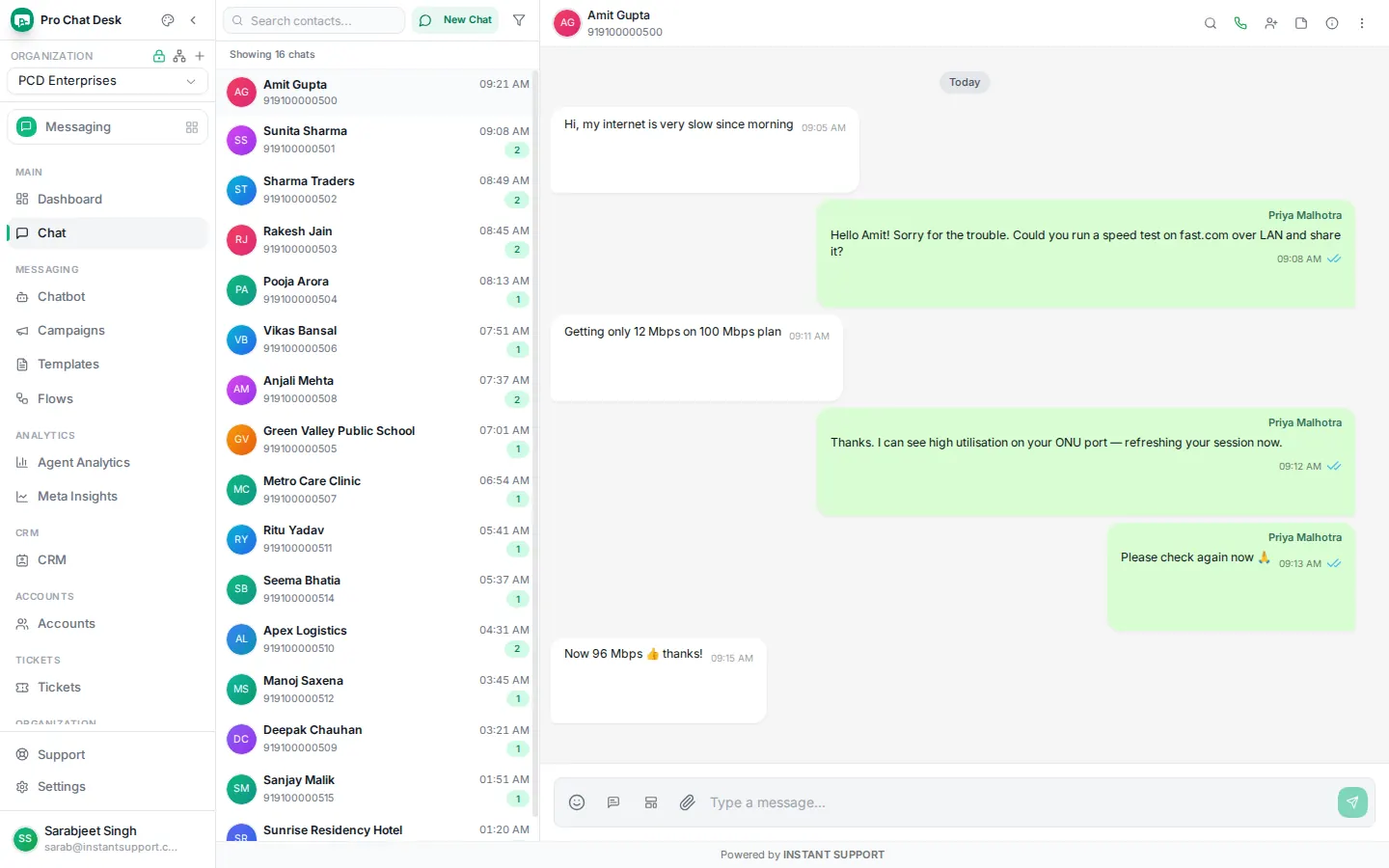
Direct Cloud API vs a partner platform
You can connect to Meta's Cloud API directly, or through a partner platform. Both use the same official API; the difference is how much you build and run yourself.
| Direct Cloud API | With Pro Chat Desk | |
|---|---|---|
| Setup | Developers, server, webhooks | Guided, no code |
| Inbox & agents | You build it | Ready shared inbox |
| Templates & campaigns | API calls | Point-and-click |
| Chatbot & AI | Build your own | Built in |
| Reporting | DIY | Dashboards |
| Support | Meta docs | Human help in India |
| Best for | Large dev teams wanting full control | Businesses that want it working today |
WhatsApp API pricing in India
There is no licence fee for the API itself. Since the move to per-message pricing, Meta charges for each template message you send, by category and by the recipient's country. Your free-form service replies inside an open 24-hour window are free.
| Message type | Who starts it | India rate (indicative) |
|---|---|---|
| Marketing | Business | ~ ₹0.78 – ₹0.99 / message |
| Utility | Business | ~ ₹0.11 – ₹0.16 / message (free inside the 24h service window) |
| Authentication | Business | ~ ₹0.11 – ₹0.13 / message |
| Service reply | Customer | Free (within the 24h window) |
Rates are set by Meta and change over time by country and category — treat these as indicative. See the current Pro Chat Desk breakdown on the message cost page, or Meta's official pricing.
Pro Chat Desk's Free Forever plan includes 2,000 conversation credits and the full shared inbox so you can try the API before you pay for volume.
Benefits of the WhatsApp Business API
Reach & open rates
Message customers where they already are, with open rates far above email or SMS.
Many agents, one number
A whole team works from a single business number with assignment and notes.
Automation 24×7
Chatbots and flows answer FAQs, track orders and book slots around the clock.
Rich, interactive messages
Images, PDFs, location, quick-reply and call-to-action buttons and list menus.
Campaigns that convert
Send approved templates by tag and track delivered, read and failed counts.
Fits your stack
Connect CRM, help desk, e-commerce and billing so data flows both ways.
Who uses the WhatsApp API
Any business that sends updates, support or offers at volume benefits. Common examples:
- E-commerce & retail: order, payment and delivery updates, abandoned-cart nudges, COD confirmation.
- Finance & fintech: transaction alerts, OTPs, statement and due-date reminders.
- Education & coaching: admission updates, fee reminders, class and exam alerts.
- Healthcare & clinics: appointment booking, reminders, reports and follow-ups.
- Travel & hospitality: bookings, tickets, check-in and itinerary messages.
- ISPs & service businesses: plan renewals, outage alerts, tickets and field updates.
- Retail
- Fintech
- Education
- Healthcare
- Travel
- ISP & telecom
- SaaS
- Logistics
Best practices
- Get clear opt-in before you message anyone — it protects your number's quality rating.
- Match the template to its category so reviews pass and messages aren't blocked.
- Reply fast inside the 24-hour window; it's free and keeps customers engaged.
- Personalise with the customer's name, order and context.
- Watch your quality rating and delivery reports; fix what customers mark as spam.
- Make replying easy with buttons and a clear call to action.
Mistakes to avoid
- Writing long, formal, email-style messages instead of short WhatsApp ones.
- Messaging people who never opted in — this gets numbers blocked fast.
- Over-messaging; too many promos drop your quality rating.
- Using a template for a purpose it wasn't approved for.
- Ignoring replies — the API is two-way; customers expect an answer.
Tip: keep marketing and OTP/transactional traffic on separate numbers. Quality rating is tied to the number, so a marketing problem shouldn't put your OTPs or order updates at risk.
Frequently asked questions
Is the WhatsApp Business API free?
The API software has no licence fee, but Meta charges per template message (marketing, utility, authentication). Service replies you send inside an open 24-hour customer-service window are free. Pro Chat Desk shows per-message rates before you send.
Can I use my existing WhatsApp number for the API?
Yes, but once migrated that number can no longer be used in the normal WhatsApp or WhatsApp Business app, and chat history isn't carried over. Many businesses connect a fresh number instead.
How long does approval take?
Connecting a number via Embedded Signup is usually instant to a few hours. Business verification can take 1–7 working days, and templates are usually reviewed within minutes to 24 hours.
Do I need coding to use the WhatsApp API?
No. The raw API needs development, but with Pro Chat Desk you connect through a guided flow and use a ready inbox, campaigns, chatbot and templates — no code.
Are messages end-to-end encrypted?
Yes, messages are encrypted in transit by default. You and your customer see the conversation in your inbox; the content isn't used for anything beyond delivering and showing it.
Can I send bulk messages?
Yes — using approved templates to opted-in contacts. Daily volume starts at a tier and increases automatically as your number keeps a good quality rating.